Guides · Desktop
Muse EEG on a computer without the phone app
August 23, 2026 · 4 min
Compare phone, LSL, and direct-Bluetooth routes for getting Muse EEG onto a computer.
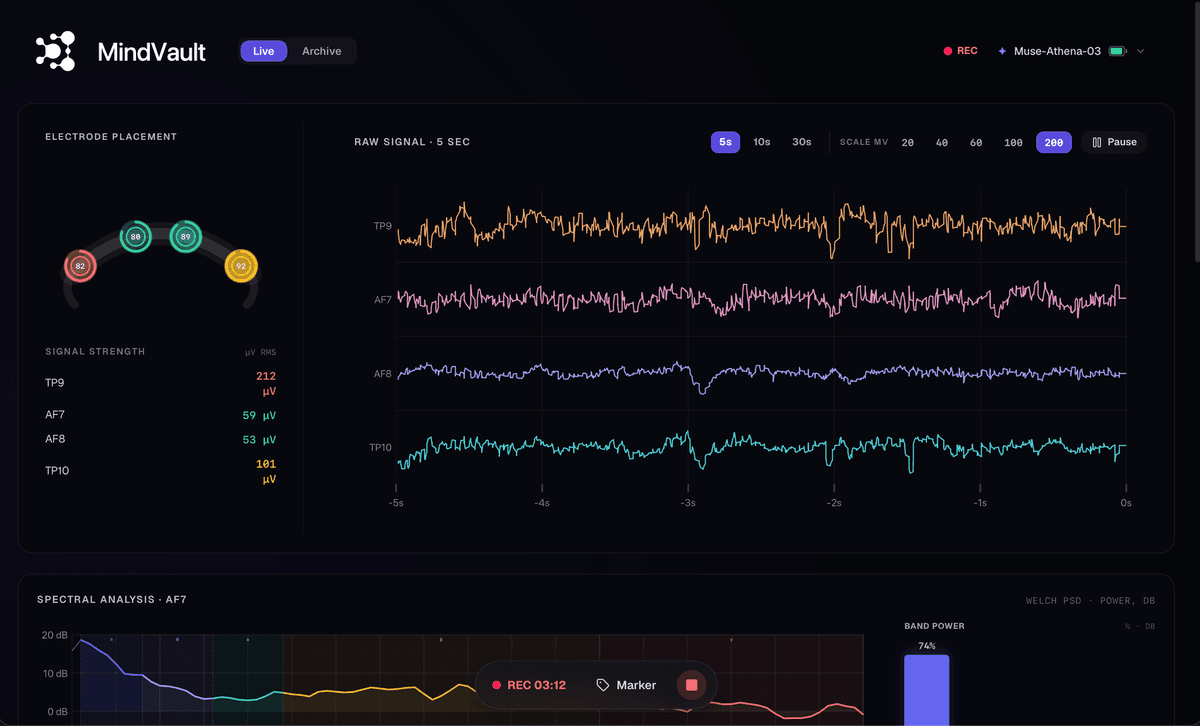
You can get Muse EEG onto a computer through a phone-to-computer stream, a Windows or command-line LSL bridge, or a desktop app that pairs the headband directly. MindVault’s current Athena release uses the direct route: four EEG channels at 256 Hz, live contact quality, CSV recording, and EDF export with no phone in the loop.
Ways to get Muse EEG onto a computer
The consumer Muse app is built for meditation scores on iOS and Android. Muse also offers licensed research software and an SDK for raw desktop and mobile data. Keep the consumer app if you want meditation features; it is not the same workflow as a raw 256 Hz desktop stream.
Mind Monitor graphs raw data on a phone, records CSV on the device, and can send OSC over Wi-Fi. That is still a phone in the loop: the computer receives data downstream rather than pairing the headband.
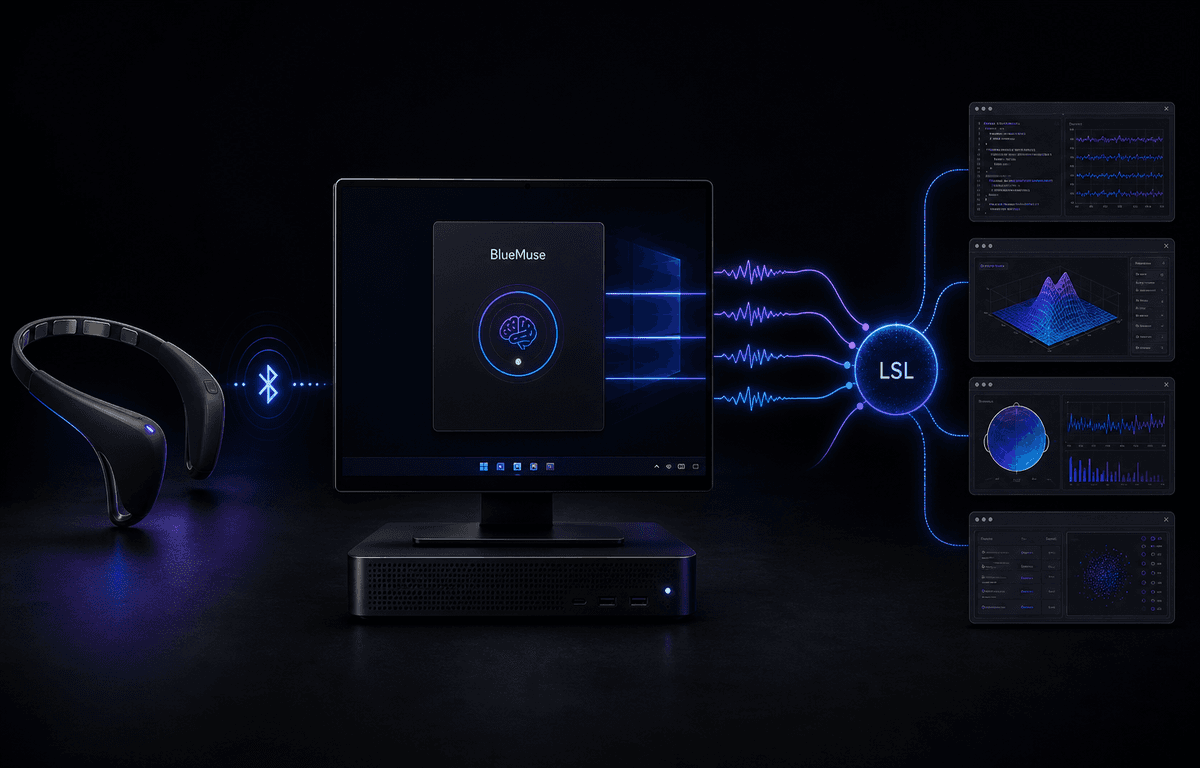
BlueMuse 3.1 puts Muse EEG on LSL from a Windows GUI. MuseLSL provides a cross-platform command-line and Python route. Both are useful when another program already receives LSL; neither is a full desktop analysis workspace.
Muse’s licensed research software combines live desktop streaming, LSL or OSC, markers, multi-device sessions, and CSV or EDF recording.
What MindVault supports now
MindVault pairs Muse S Athena over the computer’s Bluetooth. No official Muse app open. No phone bridge. The current Athena release reads TP9, AF7, AF8, and TP10 at 256 Hz, shows contact quality and live EEG, records CSV, and exports the session as EDF.
Controlled early access is rolling out across Windows, macOS, and Linux. Athena is the current validated workflow; Muse 2 and Muse S join as each headset and operating system clears the compatibility matrix.
Coming next in Lab: LSL, OSC, an HTTP API, and event markers in the same desktop session. For the current Windows LSL route and its alternatives, see the BlueMuse comparison. For MS-03 specifically, see Muse S Athena on the desktop.
Muse app vs Mind Monitor vs desktop tools
Choose by route and output. Stay on the phone for meditation scores or a pocket graph. Use an LSL tool when another program already receives the stream. Use a desktop workspace when you want pairing, a live view, and local files in one place.
| Feature | Muse app | Mind Monitor | BlueMuse | MuseLSL | Official Muse tools | MindVault |
|---|---|---|---|---|---|---|
| Runs on | Phone | Phone | Windows | CLI on Windows, macOS, Linux | Desktop and mobile | Windows, macOS, Linux rollout |
| Pairs the headband | On the phone | On the phone | On the computer | On the computer | On the computer or mobile device | On the computer |
| Primary use | Meditation scores | Phone graphs and recording | Windows LSL | CLI streaming and recording | Licensed research studies | Live Athena view and files |
| File | No desktop CSV/EDF | CSV on the phone | No built-in CSV/EDF | CSV recording | CSV and EDF | CSV, then EDF export |
| Live pipe | No | OSC over Wi-Fi | LSL | LSL | LSL and OSC | LSL and OSC coming to Lab |
| Availability | Public | Public | Public stable release | Public open source | Licensed; contact Muse | Controlled early access |
MindVault plans
Free brings 30 minutes of live EEG and contact quality to the desktop.
Base ($19/mo) adds unlimited live view, local recording, CSV, and EDF.
Coming next in Lab ($49/mo): LSL, OSC, an HTTP API, and event markers in the same session.
Research roadmap ($99/mo): adjustable notch and bandpass filters, plus raw and filtered export.
Sources and further reading
Primary sources: Muse Platform + Data, Muse SDK for developers, Mind Monitor FAQ and CSV specification, BlueMuse README, and MuseLSL.
MindVault is onboarding Athena users through controlled early access. Leave your email; we will follow up about your operating system and workflow. One reply, not a newsletter.
FAQ
- Does Mind Monitor run as a desktop Muse client?
- No. Mind Monitor is a phone app. It can send OSC to a computer over Wi-Fi. That is not pairing the hoop on the computer.
- Do I need the official Muse app open for MindVault?
- No. MindVault’s current Athena release pairs the headband directly over the computer’s Bluetooth. The meditation app is not in the loop.
- Can I record Muse EEG to CSV on the computer without LSL?
- Yes. The current Athena release records EEG to CSV and exports EDF without LSL. Controlled early access is open now; LSL is coming next in Lab.
. Put live Athena EEG, contact quality, CSV recording, and EDF export on your desktop without a phone bridge.